Reduce manual invoice entry
Capture invoice headers, amounts, taxes, currencies and line items from uploaded or authorised mailbox documents.

Capture invoices from uploads and connected mailboxes, extract structured data, perform PO and GRN matching, resolve exceptions with specialised AI agents, and post approved invoices to your ERP.
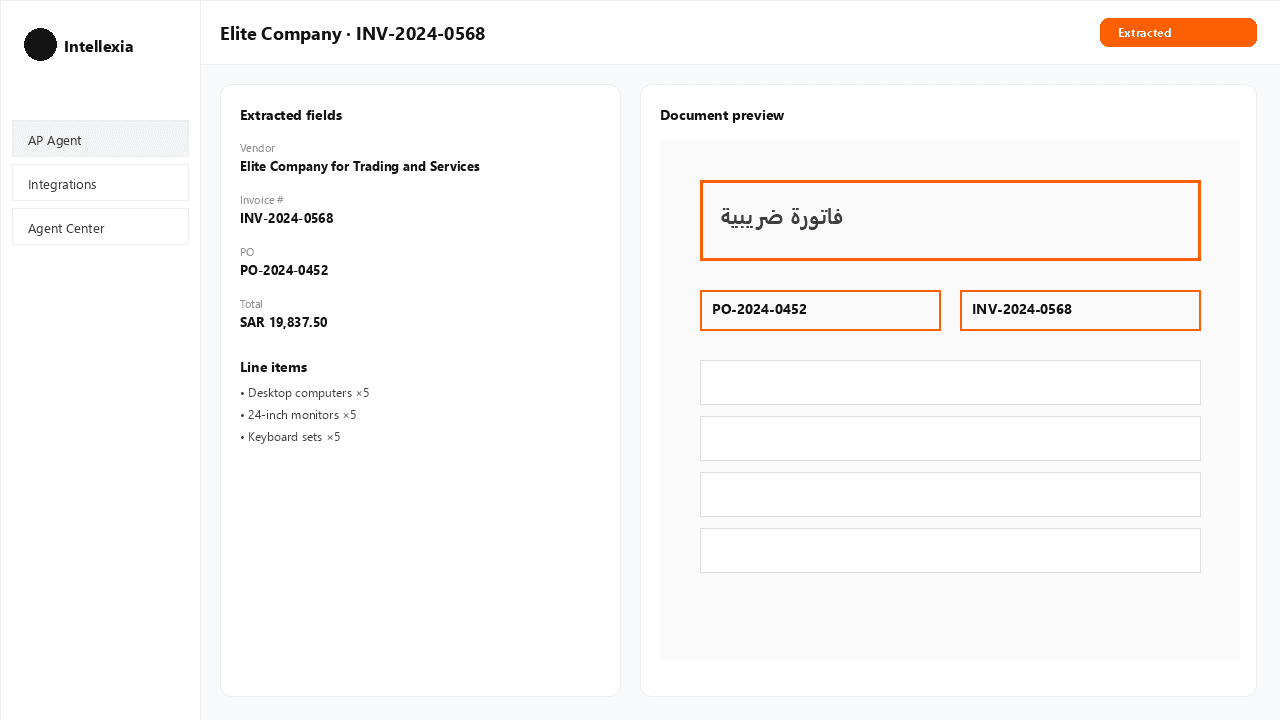
Capture invoice headers, amounts, taxes, currencies and line items from uploaded or authorised mailbox documents.
Surface duplicates, uncertain fields, mathematical issues and missing procurement references before approval.
Bring document evidence, extracted data, line items, validation results and workflow controls into one AP workspace.
Apply approval policies and role controls while retaining an auditable history of invoice activity.
Receive invoices through upload or authorised Gmail and Outlook mailboxes, then extract invoice fields, currency, taxes and line items.
Check required fields, confidence, duplicate risk, mathematical consistency and invoice-specific issues before an invoice proceeds.
Compare invoices with purchase orders (PO) and goods receipts (GRN) at header and line level to identify price, quantity and receipt variances.
Route exceptions to the right finance user and keep sensitive decisions under authorised human control.
Synchronise purchase orders and goods receipts, then post eligible approved invoices to the connected ERP with posting status and retry tracking.
Track invoice activity, review decisions, workflow events, processing states and common blockers across the organisation.
Search invoices, explain exceptions, inspect line items, prepare approvals, retry matching, and manage AP operations through a supervisor-led team of specialised AI agents.
Find invoices and the evidence behind their current status.
Summarise what failed, inspect line items and identify the next action.
Bring matching evidence and recommended actions into the review workflow.
Help teams revisit unresolved matching and validation issues.
Coordinate specialised AP tasks through a supervisor-led assistant workflow.
Configure automatic approval for eligible low-risk invoices and set vendor-specific tolerance rules.
Handle non-PO invoices, credit and debit notes, and multi-page or combined-document splitting.
Process multi-currency invoices and support Arabic invoice documents while retaining the original source document.
Prepare supplier exception email drafts and escalate approval requests when an invoice needs attention.
Support voice requests for AP operations while keeping organisation-level data isolated.
Upload an invoice or collect it from an authorised mailbox.
Capture invoice fields, currency, tax and line items with AI assistance.
Check confidence, totals, required fields and potential duplicates.
Compare invoice data with purchase orders and goods receipts.
Present exceptions, evidence and recommended next steps to the finance user.
Apply the configured approval policy and retain the decision trail.
Send eligible approved invoices to the connected ERP and track the posting outcome.
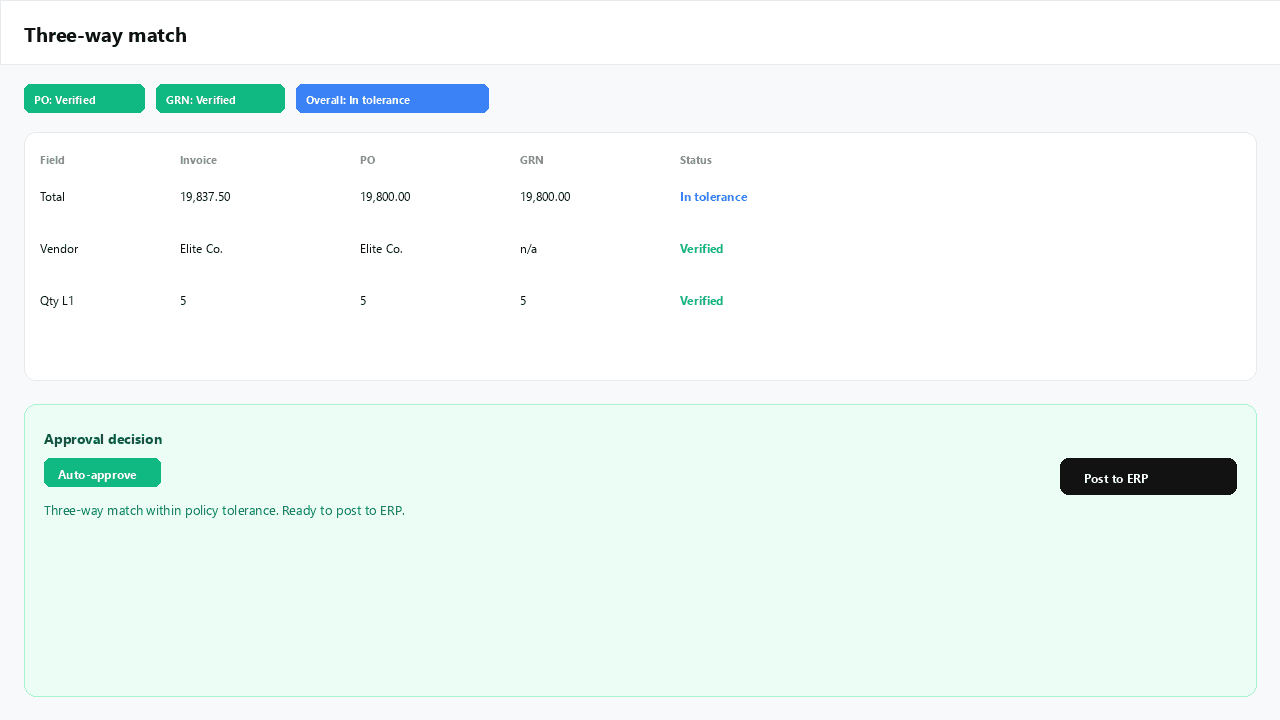
Apply matching, confidence, value and exception policies to determine when an invoice can move forward automatically or needs review.
Bring invoices in through upload or authorised Gmail and Outlook mailboxes.
ERP connector availability is confirmed per deployment, including Microsoft Dynamics 365 Business Central, ERPNext, Odoo, Oracle Fusion and SAP S/4HANA.
Retain invoice activity, decisions, matching evidence and workflow events for review.
Configured low-risk invoices can be approved automatically when they satisfy matching, confidence, value, and exception policies. Sensitive decisions and exceptions remain under authorised human control.
Yes. Authorised Gmail and Outlook mailboxes can be connected for invoice attachment upload.
Yes. Invoice lines can be compared with purchase-order and goods-receipt lines for description, quantity and price differences.
The invoice is placed in a clear waiting or exception state so a reviewer can correct data, provide a reference, classify the expense or retry processing.
The connector framework includes Microsoft Dynamics 365 Business Central, ERPNext, Odoo, Oracle Fusion and SAP S/4HANA.
Bring invoice intake, AI extraction, procurement matching, approvals and ERP workflows into one controlled process.